Showing posts with label Complete Blogger SEO Series. Show all posts
Tuesday, September 30, 2014

How To Optimize Blogger Labels, Archives and Comments (Complete SEO Part 6)

SEO (Search Engine Optimization) is the heart and play important role to get better page rank and greater visibility in search engines. In simple words we says that blog is nothing without seo. This tutorial is about some basics about optimizing techniques with you that are the some best seo tips for every blogger. These optimization techniques should apply in your blogger blog immediately for those who didn't done it before. So will learn it today optimization of the following.
Blogger SEO, Complete Blogger SEO, SEO
  • Labels
  • Archive
  • Comments
Read SEO Series

How To Optimize Blog Post Title (Part 1)

Optimizing Blogger Title By Adding Meta Tag and Meta Tag Description (Part 2)

Customize Blogger Posts With Permalinks (Part 3)

Blogger Image Optimization Importance and Some Tips (Part 4)

The Most effective SEO On Page and Off Page optimization in SEO (Part 5)

There are many SEO (Search Engine Optimization) wrong techniques have been spread out. I have suffered by adopting those. Such as like use of false link attribution which cannot be by Google Search Engine. So below i m sharing some optimization techniques.

How To Optimize Blog Labels

Labels are also important part of every blog basically we use as navigation and with the help of labels readers can easily find a specific topic under a specific category. But there is a problem when search engine crawl your blog it required only single Url for each page of your blog for indexing or crawling. By default search engine crawl each and every page and links including labels. So this is the little bit confusion for robots because they are getting duplicate content. I mean same content from Labels, Archive etc.
  • Login to your blogger dashboard.
  • Goto template.
  • Click on Edit Html.
  • Find the below code by pressing Ctrl+F
<a expr:href='data:label.url'
  • Now replace the above code with below code.
<a expr:href='data:label.url' rel='tag'
  • Save your template.

How To Optimize Blog Archive

Blog Archive is very useful widget for visitors by which they can easily find older post by using it. But blog archives has a problem for search robots. If archives are present in home page it creates a huge problems for crawler robots. If you want to solve this problem then follow the below steps.
  • Find the below code by pressing Ctrl+F
<a class='post-count-link' expr:href='data:i.url'>
  • Replace the above code with below code.
<a rel="archives" class='post-count-link' expr:href='data:i.url'>
  • Save your template.

How To Optimize Blog Comments ?

Visitors comments plays a significant role to increase your blog page rank. If you have good numbers of comments per post it helps you to increase your blog alexa rank except those comments that are spam or irrelevant. It drop your page rank in search engines. So there is the best way to optimize your blog comments for search engines to keep your comments external No-Follow. Just follow the below steps to make the share link on your comments No-Follow.
  • Find the below code by pressing Ctrl+F
expr:href='data:post.createLinkUrl'
  • Replace the above code with the below code.
rel='external nofollow'  expr:href='data:post.createLinkUrl'
Note: If you find rel="nofollow" before or after then cancel the above code and use the below code.
rel='external follow'
  • Now again find the next line.
<a expr:href='data:comment.authorUrl' 
  • Replace the above code with below code.
<a expr:href='data:comment.authorUrl' rel='external nofollow' 
  • Now save your template.
Now your blog is good to optimized completely for search engines and for better page rank. Hope these tips shows a great impact on your blog.
Read more
Monday, September 15, 2014

The Most effective SEO On Page and Off Page optimization in SEO (Complete SEO Part 5)

Blogger SEO, Complete Blogger SEO, SEO
The main purpose of SEO (Search Engine Optimization) is to boost up the rank of the blog/website, Page rank and search engine visibility. Basically SEO classified into two main areas of its operation one is On Page Optimization and other is Off Page Optimization. Under the optimization of On Page it cover whole blog/website, and on the other hand Off Page Optimization deals with the some external factors which is quietly different from blog/website optimization. But both On Page Optimization and Off Page Optimization is very necessary to become a successful blogger.
Read all series

How To Optimize Blog Post Title (Part 1)

Optimizing Blogger Title By Adding Meta Tag and Meta Tag Description (Part 2)

Customize Blogger Posts With Permalinks (Part 3)

Blogger Image Optimization Importance and Some Tips (Part 4)

Benefits of On Page and Off Page Optimization

  • It makes your blog more friendly.
  • You will gain authority.
  • You blog/website will get more visibility in search engine.
  • You can get your targets traffic.
  • Your alexa rank and page rank will improve day by day.

How To Do On Page Optimization

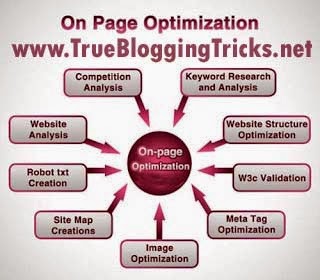
The main theme of On Page Optimization is that what sorts of options can be done to a blog/website to optimize for search engines. It deliberates optimizing different blogs/websites and its pages for good and better SEO. In On Page Optimization different things and elements plays a vital role. We can discussed those elements which that must be considered for On Page Optimization.
Blogger SEO, Complete Blogger SEO, SEO,
  • Keyword- First we have account into keyword optimization for you blog/website on priority basis. There is also the Google Keyword Tool on internet which helps you a lot to pick up a good and suitable keyword for the blog. So you must be careful to pick up a right keywords about your blog content.
  • Meta Tags- Do not use blog title more than 60 characters. It will show your blog identity to search engine.
  • Meta Description- Meta Description is also important for blog that will visible your blog into search engine and visitors can easily understand about your blog content. If you don't apply meta tag to your site so visitors will skip your site from search engine.Meta Description should be 150 words.
  • Alt Tags- Alt Tags are used to show alternate text on images or in simple words alternative names means names of images that we used in blog post. If your images was unable to load due have slow internet connection, the images will make your browser faster, then the Alt Tags will displayed on its image position. With the help Alt Tag visitor will easily understand about image, More clearly it provides description about images.
  • H1 Tags- Generally H1 tag is use for blog title. For example my H1 tag is True Blogging Tricks but it should be use only one time. otherwise search engine won't understand about your blog title. This tag provides a lot of good impressions and will tell the visitors and web crawlers.
  • H2 Tags- Generally your blog post title should go under H2 tag. Because search engine give priority to H1 tag then H2 tag and then finally H3 tag.
  • H3 Tags- Basically when search engine can't find your blog post title in H2 tag then must goes with H3 tag. But you have convert H3 to H2 to get more emphasize from search engine.
  • H4 Tags and H6 Tags- These tags have less importance than any other tags but have importance for better SEO.
  • Post Title and Post URL- Another important thing is post title and post url it must consider according to search terms. Post title and post url must be related to the content of the blog post. It must reflect the theme and description of post, so the visitor must clear from the post title and post title that what is the post about. The post url must be appropriate and related to the post content. You can also customize you post url with the help of permalink.
  • Blog Content- Blog content is the king and heart of your blog/site. So must write unique and relevant content for your blog. Remember post content is responsible for page rank.
  • Internal Link Strategy- Your post be link internally with other posts. By internally linking strategy you r readers might be interested in reading other related articles by which your page visits increase and you can engage your visitors longer time on your blog. For internal link building you may also take help from related posts or if you writing a content then you can add links of previous posts.
  • Submit Sitemap Webmaster Tools - Table of Contents- You must submit a sitemap to Google and Bing/Yahoo etc search engines, and by add table of contents visitors can easily navigate to other pages simply.

How To Do Off Page Optimization


Off Page Optimization include blog optimization with the help of some external elements to generate traffic to your blog. Off Page Optimization consider the following.
  • Commenting of other blog posts.
  • Sharing you post on different social networks.
  • Forum posting.
  • Making guest posting on other blogs.
  • Directory submission.
  • RSS Feed subscription.
  • Exchanges links with other related websites.
Read more
Tuesday, September 02, 2014

Blogger Image Optimization Importance and Some Tips (Complete SEO Part 4)

Now we are in the era of blogging. A new blogger must know about optimization and also must be aware about blog optimization other wise they will depressed instead of becoming successful blogger. A blogger must spend extra time behind their blog. So previously we have already discussed about some SEO topic.
Complete SEO Series

How To Optimize Blog Post Title ( Part 1)

Optimizing Blogger Title By Adding Meta Tag and Meta Tag Description (Part 2)

Customize Blogger Posts With Permalinks (Part 3)

Today we will discuss about how to optimize blog images. New bloggers don't know about image optimization. But according to SEO it plays an important role to drive a traffic from search engine to your blog. In case if you write my blog truebloggetricks.net in Google Search Engine and under images you will see optimize images that got. If you want to optimize your blog images then follow the dimple steps.
Blogger SEO, Complete Blogger SEO, SEO

Image Size

Its better to choose a small size images. You can easily compress images from different like Photoshop or any other. Always try to keep less than 100KB and resolution should not be more than 600px X 500px for better optimization.

Image Format

The most popular formats of images are jpeg, png and gif format, because image with these formats will be small and better.
  • JPEG is the format of image with an adjustable degree of compression. JPEG images are mostly and frequently used on websites.
  • PNG is also the format of images which support transparency. PNG is loss-less alternative for GIF format.
  • GIF are with 256 colors or less and also loss-less for images. This format support animations which is still used on certain websites.

Title Text & alt text

In blogger blog post you can tag images also most importantly tag images get a specific name in search engine, simply it gives a identity to image. In blogger post when you upload image click on it a bar will appear choose Properties and Fill Title Text as Post Title and add keyword in Alt Text field. If you use more than 2 images in blog post you will definitely  do this before giving Tag name and Alternative tag name. 
Blogger SEO, Complete Blogger SEO, SEO
In this tutorial i m trying to giving you good idea about image optimization thus by this way you can get traffic from your blog images as well. If you have more something new share it in the comment box. Your comment and feedback are valuable for us.
Read more
Thursday, August 21, 2014

Customize Blogger Posts With Permalinks (Complete SEO Part 3)

Under this article we are trying to give you some information about Blogger Permalink. A permalink is that URL which points to specific entry after it passed from the front page to the archives. Generally blogger generates this permalink on the basis of your blogger post title. Something like this if your blog post title is "Customize your posts with Blogger Permalinks" then the blog post permalink would like this "customize-your-posts-with-blogger.html". So this feature for bloggers to control what the permalink should be but it rather assigned a permalink on its own.

Must Read: How To Optimize Blog Post Title (Complete SEO Part 1)

Blogger SEO, Complete Blogger SEO, SEO

Must Read: Optimizing Blogger Title By Adding Meta Tag and Meta Tag Description (Complete SEO Part 2)

If you want to use custom permalink just click on the right side, by default blog keep it automatic permalink with your current post title. But if you want to specify just click on custom permalink and enter your custom permalink over there. It will allows you to enter hyphens and alphabets. This links helps you to make your content or post payable in RSS Feed and Atom.
Blogger SEO, Complete Blogger SEO, SEO
The final permalink will be something like below.
http://yourblog.blogspot.com/yyyy/mm/custom-permanent-link.html
There is no limit to the length of custom permalink URL. So use permalink for your blog because it helps to make a little impact in SEO.
Read more
Thursday, July 31, 2014

Optimizing Blogger Title By Adding Meta Tag and Meta Tag Description (Complete SEO Part 2)

Blogger SEO, Complete Blogger SEO, SEO
Today i m going to share the second part of previous article. In this post i will discuss How to Optimize Blogger Title By Adding Meta Tag and Meta Tag Description manually which helps to make your blog SEO friendly. According to SEO by adding meta tag specially meta description is the most important one. By adding meta tags you can get more traffic from search engines like Google, Yahoo, Bing etc. On the other search engine always want to get the specific information about your blog that you can specified by adding the following meta tag codes.

Must Read: How To Optimize Blog Post Title (Complete SEO Part 1)

  • Login to your blogger dashboard.
  • Goto to template and click on Edit HTML.
  • Find this code <title><data:blog.pageTitle/></title> by pressing Ctrl+F
  • Replace the below code with <title><data:blog.pageTitle/></title>
<b:if cond='data:blog.pageType == &quot;index&quot;'>
<title><data:blog.pageTitle/></title>
<b:else/>
<title><data:blog.pageName/> | <data:blog.title/></title>
</b:if>
  • Now again find <head> by pressing Ctrl+F.
  • Paste the below code after <head>
<b:include data='blog' name='all-head-content'/>
<meta content='Your Blog Description Here' name='description'/>
<meta content='Add Keyword here' name='keywords'/>
<meta content='Your name here' name='author'/>
<meta content='never' name='Expires'/>
<meta content='INDEX,FOLLOW' name='Robots'/>
<meta content='4 Days' name='Revisit-after'/>
  •  Change the highlighted lines with your information.
  • Save your template and you done it.
Read more
Thursday, July 10, 2014

How To Optimize Blog Post Title (Complete SEO Part 1)

Blogger SEO, Complete Blogger SEO, SEO
Many blogger in the worlds used different kinds of custom templates according to their likes. We see many attracting and eye catching but unfortunately the template are not friendly SEO. Every one knows that blogger is the product of Google and Google brings a lot of changes about the way of SEO (Search Engine Optimization). So making blog template friendly SEO is very important. Generally search engines give much importance to title tags like <H1>, <H2>, <H3>, <H4>, <H5>, <H6> but <H1> is most important title tag for search engines which is basically used to blog title. After that <H2> tag is used for post title if the post title is not under <H2> tag then the search engine automatically goes for <H3> tag which is not good for SEO. By defaults blogger templates used <H3> tag for post title. But now used <H2> tag is better for post title. It's not only increase visibility and also make your blog beautiful in search results as well as make your blog user friendly.

How To Optimize Blog Post Title ?

  • Login to blogger dashboard.
  • Goto template and click on EDIT HTML.
  • Find the below code by pressing Ctrl+F
<h3 class='post-title entry-title' itemprop='name'> and closing tag </h3>
Blogger SEO, Complete Blogger SEO, SEO

  •  Change the digit only from <H3> to <H2>. You will get this tag two times.
  • After do that click on save button and you done it.

I will discuss complete SEO part by part so visiting

Read more

Contact Form

Name

Email *

Message *


Blog Archive

Support Us

About Author

Hi Friends, my name is Rj HaSsan and i m 20 years old, certified SEO consultant, addicted blogger and the Entrepreneur of True Blogging Tricks who based out of the wonderful country name "Pakistan". ...Read More